Courier and delivery software in Egypt: shipment entry, cash on delivery (COD), and settling driver cash and merchant accounts
A courier in Egypt doesn't just move parcels; it moves merchants' money too, because cash on delivery is the usual way many buyers pay Facebook and Instagram sellers and online stores. Accurate settlement starts with every shipment having a recorded COD amount and a clear status (delivered, postponed, returned); then each driver's cash is matched daily against the shipments they actually delivered, and each merchant's balance is calculated after shipping fees.
Last updated:
Why courier work is different in Egypt
A large share of e-commerce in Egypt runs through Facebook and Instagram pages and small online stores, and many buyers prefer cash on delivery because they want to see the product before paying or don't yet trust a new store. That gives an Egyptian courier a double responsibility: delivering the parcel on time, and collecting its price and handing it to the merchant in full on the agreed date.
The same challenges show up at most companies: the merchant sends shipments in a WhatsApp message or a messy Excel file, a receiver in a distant governorate calls to ask about their parcel, the driver comes back at the end of the day with cash nobody can tie precisely to shipments, and when the merchant asks for their money at week's end, the answer takes hours of manual matching. With frequent returns and postponements, the accounts get even more tangled.
This guide walks through the whole shipment cycle with the details of the Egyptian market. If you're comparing customer management systems in general, see the guide to the best CRM in Egypt or RabetCRM in Egypt.
Entering merchant shipments in bulk instead of one by one
Agree with each merchant on an Excel file with fixed columns that they send daily; that alone saves a lot of time and cuts mistakes in mobile numbers and amounts. In RabetCRM for courier and delivery companies you copy the columns from Excel and paste them, creating dozens of shipments in seconds, each with its own AWB number and its COD amount recorded in EGP.
- Receiver name and mobile number, ideally with a backup number
- Governorate, area and full address with a nearby landmark
- COD amount in EGP, or zero if prepaid
- Contents description and number of pieces
- Merchant instructions: may the receiver open the parcel before paying?
The AWB and the receiver's tracking link
The AWB is the parcel's identity for its whole journey: a unique number linking the physical package to its record in the system, with the receiver's name, mobile, address and COD amount printed clearly. RabetCRM prints a 100×150 mm AWB with a QR code, a common size for thermal label printers. Print AWBs as soon as shipments are entered and stick them on before parcels leave the warehouse.
Every shipment in RabetCRM has a tracking link the receiver opens without signing up, showing its movement history, and receivers get a WhatsApp message with status updates. Mention the page or store they bought from and the COD amount, so they have the cash ready and are available. A receiver who knows the driver is coming answers the phone, which cuts wasted runs and returns.
Assigning shipments to drivers by area and governorate
Divide your service area into fixed zones: inside Greater Cairo, for example, zones for Nasr City and Heliopolis, Maadi and Mokattam, Giza, October and Zayed, and New Cairo. Give each driver a zone whose streets they know. Shipments to other governorates may go through a local driver or partner, and they need clear statuses so they don't get lost between the two.
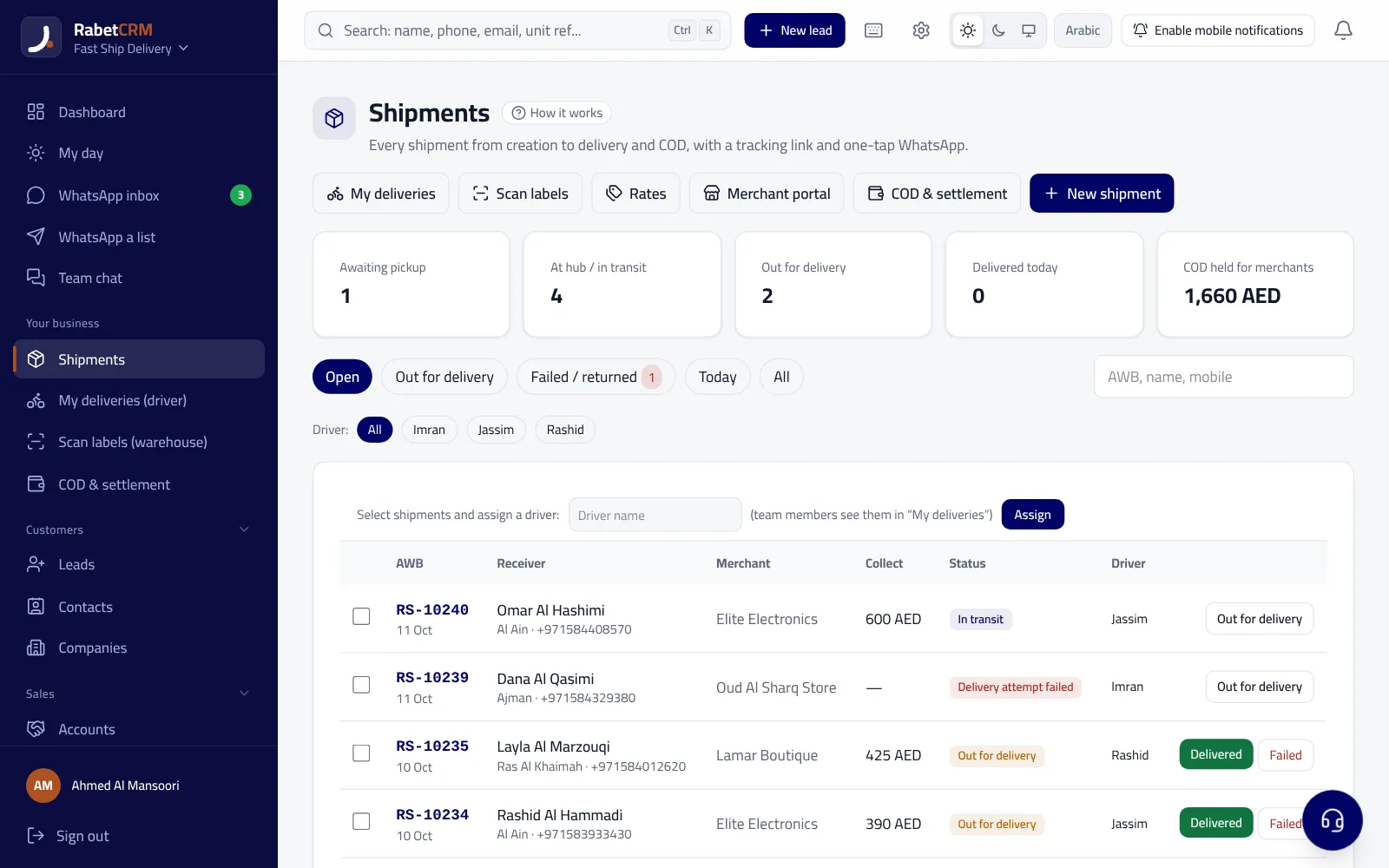
In RabetCRM shipments are assigned to drivers in bulk and each one's status updates from pickup through delivery or return, so the operations desk always knows how many shipments each driver holds, how many are delivered and how many remain. Set a fixed cut-off for merchant drop-offs so parcels go out the same or next day, and balance loads across drivers; an overloaded driver will inevitably postpone some.
| Status | Meaning | Effect on COD |
|---|---|---|
| Picked up from merchant | The parcel is in the courier's custody | Nothing collected yet |
| Out for delivery | The parcel is with the driver | Amount expected today |
| Delivered | Handed over and cash collected | Goes into the driver's cash, then the merchant's balance |
| Postponed | Receiver asked for another time or didn't answer | Not counted until actually delivered |
| Returned | Receiver refused or delivery failed | No COD to the merchant; a return fee may apply per agreement |
Settling driver cash every day
The first stage of settlement is between the company and the driver, and it should happen daily. At the end of the day, the cash a driver hands in should match the total COD on shipments marked delivered under their name, no more and no less. Any difference should be explained immediately: a shipment marked delivered by mistake, a receiver who paid a different amount after agreeing with the merchant, or cash not yet handed over.
Because the COD amount is recorded on every shipment in RabetCRM, and shipments are assigned to drivers with their statuses, you know which shipments each driver delivered and their amounts, so matching becomes a quick review instead of manual maths. Never allow a COD change over the phone without recording it on the shipment itself; that's the most common source of end-of-day differences.
- Match each driver's cash daily against the shipments delivered under their name
- Record any COD change on the shipment before delivery
- Update postponed and returned statuses before closing the day
- Don't defer a cash handover to the next day without a recorded reason
Merchant settlement: the trust you keep
The second stage is between the company and the merchant. On the agreed settlement date (daily, twice a week or weekly, as you agree), the merchant is owed the total collected on their delivered shipments, minus shipping fees and, depending on the agreement, return fees. Shipping fees may differ by governorate or weight, so put them in a clear written agreement with each merchant before the first shipment.
RabetCRM calculates what's been collected for each merchant after deducting shipping fees, with a per-merchant report and one-tap settlement. Send the merchant a statement of delivered and returned shipments, amounts and fees with every settlement, however you transfer the money. A merchant who gets paid on time with a clear statement is the one who sends you more volume and recommends you to others.
Returns in the Egyptian market and how to reduce them
A return costs the courier a run without full revenue, and costs the merchant stock that came back and a lost sale. The usual causes: a receiver who doesn't answer, an incomplete address, a buyer who changed their mind, or a parcel refused after opening. Track the reason for each return per merchant and per area, because each has a fix: a WhatsApp message before arrival, asking the merchant for a better address and a backup number, or advising the merchant to confirm orders with buyers before shipping.
Over time, returns data becomes a negotiating tool: you know which merchants' orders need better confirmation and which areas need different run planning, without relying on impressions alone.
Get your courier company organised
Start with whatever eats most of your team's time: if it's shipment entry, begin with bulk import and AWBs; if it's receiver calls, begin with tracking links and WhatsApp messages; if merchants complain about late payouts, begin with recording COD on every shipment and regular settlement. You can also connect the company's WhatsApp number to a shared inbox in the system to answer merchants and receivers, with permissions for each employee by role.
Remember that receivers' data (names, numbers and addresses) is personal data whose handling in Egypt falls under Personal Data Protection Law No. 151 of 2020, so limit access to those who need it. RabetCRM for courier and delivery companies runs in Arabic and English, with prices in EGP when you choose Egypt on the pricing page. Start with one user and add drivers later, with a 15-day free trial. Also read about laundry software in Egypt if you serve laundries that need organised delivery.
More articles
FAQ
What is the best software for a small courier company in Egypt?
The best one imports merchant shipments in bulk from Excel, prints AWBs, assigns shipments to drivers, records the COD amount on every shipment, and calculates each merchant's balance after shipping fees. RabetCRM brings that together in Arabic with a 15-day free trial.
How do I calculate a driver's cash at day end?
Add up the COD on shipments marked delivered under that driver's name that day, compare it with the cash handed in, and explain any difference immediately.
How do I settle COD accounts with merchants?
For each merchant, total the amounts collected on their delivered shipments minus shipping fees and any agreed return fees, and send a detailed statement on the settlement date. RabetCRM calculates this automatically with one-tap settlement.
Can the receiver track their shipment?
Yes. Every shipment has a tracking link the receiver opens without signing up, showing its movement history, plus a WhatsApp status update.
Is a returned shipment's amount credited to the merchant?
No. A returned shipment wasn't paid for, so it isn't part of the merchant's balance, and a return fee may be deducted if your agreement says so.